Sử dụng LangChain để tạo hệ thống RAG (tiếp tục)
Nó cũng sẽ là cần thiết để cài đặt các thư viện Numpy và Pandas, khi chúng sẽ được sử dụng trong các bước xử lí
và load tập dữ liệu.
import numpy as np
import pandas as pd
Vì tôi đang sử dụng cùng tập dữ liệu như trong học phần trước, tôi sẽ không đi vào các chi tiết về làm cách nào
load nó. Chỉ nhớ lại rằng tập dữ liệu là có sẵn trên Kaggle, và bạn có thể download .zip file và unzip nó
trong bất cứ thư mục nào truy cập được đối với notebook. Nhưng tôi sẽ lặp lại ở đây code sử dụng trong notebook,
cái kết nối trực tiếp tới Kaggle để dowload zip file và copy nó vào một thư mục Colab.
Trước tiên, code cái liên kết Google Colab với Google Drive để lưu các files trong một thư mục cố định trên Drive.
from google.colab import drive
drive.mount(‘/content/drive’)
Một khi liên kết Colab với Drive được thiết lập, nó chính là vấn đề của giành tập dữ liệu Kaggle và copy .csv file
vào thư mục được chọn. Tôi nhắc bạn rằng bạn nên có một tài khoản Kaggle và giành Kaggle credentials của bạn trong
một .json file, cái nên ở trong thư mục cấu hình trong biến môi trường KAGGLE_CONFIG_DIR. Cho các chi tiết hơn,
bạn có thể đi tới phần “Preparing the Dataset” trong “Creating a RAG System with News Dataset,” các học phần trước
!pip install kaggle
import os
#This directory should contain you kaggle.json file with you key
os.environ[‘KAGGLE_CONFIG_DIR’] = ‘/content/drive/MyDrive/kaggle’
!kaggle datasets download -d kotartemiy/topic-labeled-news-dataset
import zipfile
# Define the path to your zip file
file_path = ‘/content/topic-labeled-news-dataset.zip’
with zipfile.ZipFile(file_path, ‘r’) as zip_ref:
zip_ref.extractall(‘/content/drive/MyDrive/kaggle’)
news = pd.read_csv(‘/content/drive/MyDrive/kaggle/labelled_newscatcher_dataset.csv’, sep=’;’)
MAX_NEWS = 1000
DOCUMENT=”title”
TOPIC=”topic”
#news = pd.read_csv(‘/content/drive/MyDrive/kaggle/bbc_news.csv’)
#MAX_NEWS = 500
#DOCUMENT=”description”
#TOPIC=”title”
#Because it is just a course we select a small portion of News.
subset_news = news.head(MAX_NEWS)
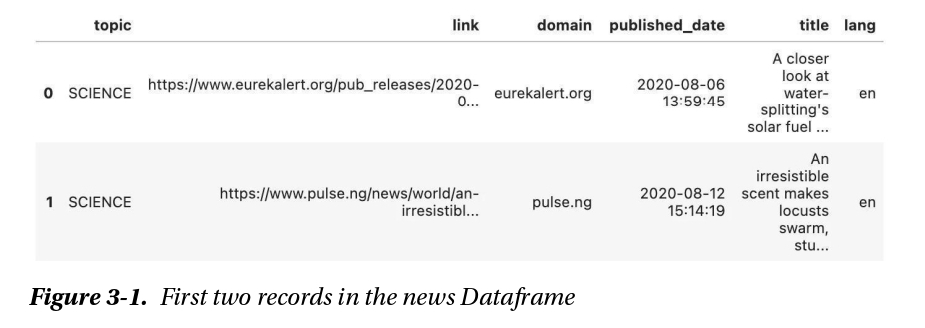
news.head(2)
Sau khi thực thi các dòng này, bạn có một phần của tập dữ liệu trong news DataFrame, cái chúng ta sẽ sử dụng để
cung cấp cho CSDL vector.
Hãy nhìn vào hai hồ sơ đầu tiên (ảnh dưới) của topic-labeled-news-dataset.