

Chuẩn bị tập dữ liệu (tiếp tục)
Bây giờ rằng notebook của bạn được kết nối Drive, bạn có thể đi tới Kaggle, download các tập dữ liệu, unzip các
files, và copy chúng vào thư mục lựa chọn của bạn.
Trong notebook, bạn sẽ thấy code để tự động hóa quá trình này.
#install kaggle library to access kaggle resources.
!pip install kaggle
#configuring default directory for kaggle, it should contain the kaggle.json file.
import os
os.environ[‘KAGGLE_CONFIG_DIR’] = ‘/content/drive/MyDrive/kaggle’
Để truy cập các tập dữ liệu, copy kaggle.json file, cái chứa Kaggle credentials của bạn, vào thư mục chỉ ra trong
biến môi trường KAGGLE_CONFIG_DIR.
#Command to Download the Dataset from kaggle
!kaggle datasets download -d kotartemiy/topic-labeled-news-dataset
#unzip and copy the files
import zipfile
# Define the path to your zip file
file_path = ‘/content/topic-labeled-news-dataset.zip’
with zipfile.ZipFile(file_path, ‘r’) as zip_ref:zip_ref.extractall(‘/content/drive/MyDrive/kaggle’)
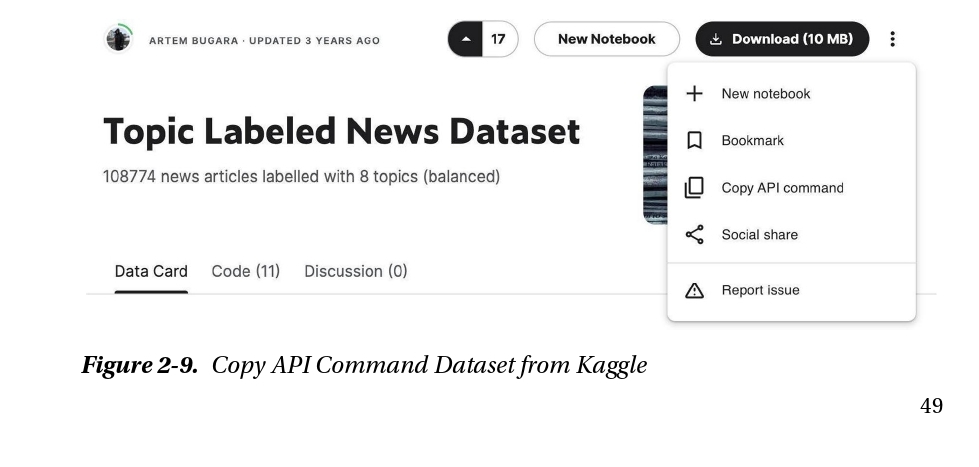
Lệnh để download tập dữ liệu có thể được giành từ trang các chi tiết tập dữ liệu bản thân nó.
Như thể hiện ảnh dưới, trong góc phải trên, bạn có thể mở menu với 3 dấu chấm, và giữa các tùy chọn, bạn sẽ thấy
Copy API Command.
Một khi .csv file với dữ liệu là ở trong thư mục yêu cầu, bạn có thể load nó với Pandas để bắt đầu làm việc với nó.